A strong membership program can carry your business through slow seasons, keep your techs busy, and turn one-time customers into loyal ones. But launching one is only the start.
“Memberships offer recurring revenue,” said PCG consultant Amanda Haggerty. “They definitely aren’t set it and forget it. Memberships still have to be maintained.”
Haggerty has seven years of experience in ServiceTitan and the trades, working in HVAC, plumbing, electrical, and generators. She has been a logistics coordinator, membership coordinator, inventory implementation lead, and operations manager. She has built membership programs and kept them running day to day.
Here’s how to set up ServiceTitan Memberships the right way, from the first template to the last visit.
A membership is a standard, recurring service you offer to every customer, often with a discount for staying a member. Think HVAC tune-ups, water heater flushes, or a yearly electrical safety check.
Memberships are “cookie cutter” by design. The same plan works for any customer. That’s the main difference from a service agreement, which is built for one specific customer. (More on that below.)
Why offer one? Haggerty points to four big benefits:
You might be thinking, but what if one customer has one HVAC unit and another has six? They can’t have the same membership. They can – to start.
Haggerty recommends one base membership plus add-ons. Sell the base membership, then add add-ons for extra units.
Why not build several memberships? They’re harder to track. At renewal time, it’s hard to know which ones to renew. And overlapping memberships can give customers discounts you never meant to offer.
Do you offer different services? Perhaps your base membership includes two HVAC maintenance visits in a year. You can create an add-on for an electrical safety inspection, and/or an add-on for a water heater flush. Then, you can add more recurring service events when the membership is sold, using different task codes.
How often should visits happen? That depends on what you offer.
Once your settings are in place, ServiceTitan creates those visits on schedule.
Match each visit template to its trade. An electrical visit goes in your electrical business unit. An HVAC visit goes in HVAC.
This matters for deferred revenue. Membership money may sit in one liability account. When each visit is done, ServiceTitan recognizes that revenue and sends it to the right business unit.
Why would you want deferred revenue? You want to get paid now, right?
“You do get paid now, you just recognize it later,” Haggerty said.
Deferred revenue is money a customer pays up front for service you’ll deliver later. It sits in a liability account until the work is done. Then ServiceTitan moves it to revenue, and it’s free to use for things like payroll or getting through a slow season.
Here’s what it should look like when it’s working:
If your numbers don’t follow that pattern, it’s time to take a closer look.
Membership discounts can be based on your pricebook, business units, or categories. You can also decide item by item whether a pricebook item can be discounted for members.
One setting to check: whether a customer gets a member discount on the same invoice where they buy the membership.
“Sometimes you don’t want to sell a membership and on that same invoice, discount a water heater or HVAC install,” Haggerty said.
And what if a customer joins to get a discount on a big job, then cancels a week later? Amanda recommends invoicing them for the discount received on that job. Just make sure that stipulation is spelled out in your membership terms and conditions. Your tech doesn’t have to go over all the nitty gritty details on-site, but a timely Marketing Pro campaign to welcome new members comes in very handy for calling out important details and the T&C should be available on your website!
Collect the first payment when the membership is sold, whether it’s billed yearly or monthly. From there, set up recurring billing so invoices are created and charged on dates you choose.
For example: every membership with a next bill date between the 1st and 7th of the month gets an invoice on the 1st and is charged on the 5th.
A few tips:
There are two places to see what visits need to be booked:
To help customers remember to book, send reminder texts. You don’t need Marketing Pro for this, since they’re transactional. If you use the Customer Portal, add the link so customers can book their visit online.
Haggerty’s other two tips:
When a CSR books a maintenance visit but doesn’t select the recurring service event, the visit isn’t tied to the membership. That throws off your tracking and your revenue recognition.
To prevent it:
If one slips through, link the event before the job is closed. The technician can also mark the event completed. If that doesn’t happen, you can dismiss the recurring service event after the fact so the revenue is recognized.
Service agreements are now fully built into ServiceTitan, and you can send them to clients to e-sign. Here’s how they compare:
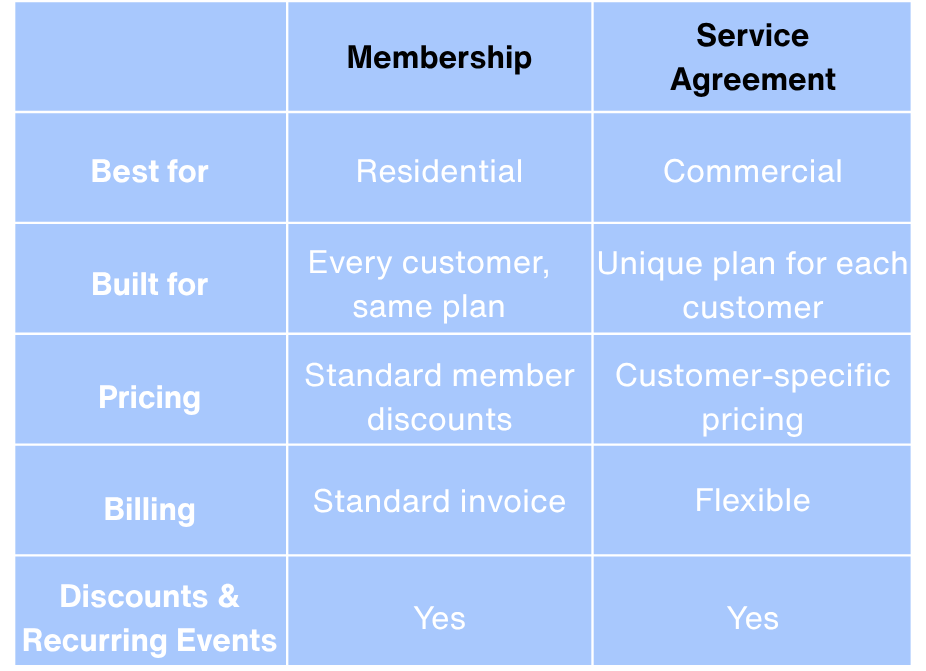
For example, an owner with 10 restaurant locations might get a lower rate and pay per visit, because they bring you more work. A single-location shop might pay a premium price and be billed quarterly.
Once your service agreement document template is set up, they’re easy to use. ServiceTitan even warns you if a visit is booked outside the expected time frame or a charge doesn’t match the template. You can override the warning if you need to.
Ready to build a membership program that runs smoothly? Powerhouse Consulting Group helps skilled trades companies set up ServiceTitan Memberships, recurring billing, and deferred revenue so the money and the visits stay on track. [Let’s talk.]